· 8 min read
Making Rockbox fast on a 1 TB iPod
Finding and fixing the slow paths in Rockbox for a huge music library, the day my test builds corrupted the drive, and two features I added along the way.
CC0 1.0 — public domain, use it however you like. The Apple logo and iPod name on it are Apple's trademarks.
Rockbox · C · Embedded · iPod
My daily music player is a 2005 iPod Video. It has a 1 TB iFlash card where the
hard drive used to be, a 3000 mAh battery, and runs
Rockbox, the open source firmware that replaced
Apple’s years ago. The library is big and it’s organised in folders, not a
database: /Music/Artist/Album/track, with a lot of Japanese, Korean and
Russian in the names.
It worked, but it was slow in exactly the places I used most. Inserting a folder into a big playlist froze the screen for seconds. Playing my whole Music folder took forever to start. After every boot the iPod was busy for a while before it felt responsive. So I spent a weekend reading the Rockbox source to find out why. I’m not very familiar with C, so I worked through it with Claude Code as a pairing partner: it helped me read and understand the code, write the fixes and tests, and build the firmware, a lot faster than I could have alone.
Everything here is on GitHub in rockbox_optimised, with a script that builds it for the iPod Video.
The hardware
The iPod Video runs on a PortalPlayer PP5022: two ARM7 cores at about 80 MHz and 32 or 64 MB of RAM. Nothing on it is fast, so work that is invisible on a laptop becomes seconds on the device. A loop that touches every entry of a 30,000-track playlist once is fine. A loop that does that for every track you insert is not.
Finding the slow paths
Rockbox keeps a playlist as an array of offsets into the playlist file, one per track. Inserting a track shifted every entry after it down by one, one element at a time:
/* shift indices so that track can be added */
for (i=playlist->amount; i>insert_position; i--)
{
    playlist->indices[i] = playlist->indices[i-1];
    if (dcfrefs)
        dcfrefs[i] = dcfrefs[i-1];
}
Fine for one track. But “Insert next” on a folder adds its tracks one by one, so inserting K tracks into a playlist of N costs about K × N moves.
The second one was in the code that adds a folder and all its subfolders. It loads a folder into the file browser’s shared list, and recursing into a subfolder overwrites that list, so after every subfolder it read the parent from disk and sorted it again. A Music folder with 1,000 artists got read and sorted 1,000 times.
Before changing anything I wanted to know whether these mattered, so I copied the loops into a small C benchmark and ran them at library sizes:
| Case | Before | After |
|---|---|---|
| Insert 5,000 tracks into 30,000 | 136 ms, 150 M element moves | 0.02 ms |
| Insert 30,000 tracks into 30,000 | 814 ms, 900 M element moves | 0.1 ms |
| Recursive play, 3,000 artist folders | 9.1 M entries read, 1,252 ms | 120 K, 6.5 ms |
That’s on a laptop. On an 80 MHz ARM7 it’s easily 50 to 100 times slower, so the 814 ms row is well over a minute of frozen screen.
Fix 1: a gap buffer for inserts
Text editors solved this decades ago. While a batch of inserts is running, the tail of the array is parked at the end of the buffer once, leaving a gap at the insert position. Each new track then goes into the gap in constant time. The gap closes when the batch ends, before anything else reads the playlist.
static void make_room_for_track(struct playlist_info *playlist,
                                int insert_position)
{
    if (insert_gap.playlist == playlist)
    {
        if (insert_gap.len > 0 && insert_gap.pos != insert_position)
        {
            if (insert_position < insert_gap.pos)
                move_indices(playlist, insert_position + insert_gap.len,
                             insert_position, insert_gap.pos - insert_position);
            else
                move_indices(playlist, insert_gap.pos,
                             insert_gap.pos + insert_gap.len,
                             insert_position - insert_gap.pos);
            insert_gap.pos = insert_position;
        }

        if (insert_gap.len == 0 && insert_position < playlist->amount)
            insert_gap_open(playlist, insert_position);

        if (insert_gap.len > 0)
        {
            insert_gap.pos++;
            insert_gap.len--;
            return;
        }
    }

    move_indices(playlist, insert_position + 1, insert_position,
                 playlist->amount - insert_position);
}
Consecutive inserts (“Insert”, “Insert next”, “Insert last” on a shuffled playlist) now cost O(1) each. Random ones, like “Insert shuffled”, only move the entries between the old and new gap position. Resuming at power-on replays every insert from a control file, so it got the same treatment.
Fix 2: read each folder once
For the recursion, the fix is to copy the folder’s names out of the shared list before recursing, and walk the copy. One read and one sort per folder, however many subfolders it has.
Proving nothing changed
Speed doesn’t matter if the playlist comes out different, and a wrong playlist on disk is the kind of bug that follows you around. Rockbox has a desktop simulator, so I built it twice, once unmodified and once with my changes, and wrote a test plugin that runs every insert mode against the same library, then dumps the full track order, flags, positions and the resume file. Then it replays the resume file and dumps everything again.
Both builds had to produce byte-identical output. They did: 21 checkpoints, 14,895 lines, including a playlist filled to the 32,000-track limit. The simulator timings, stock against patched:
| Simulator | Stock | Patched |
|---|---|---|
| Insert 4,000 into 24,000 | 0.43 s | 0.26 s |
| Recursive play, 3,000 folders | 10.7 s | 0.66 s |
| Resume 16,000 + 4,000 inserted | 0.08 s | ~0 s |
Measuring on the iPod
The simulator can’t tell you how a real device behaves, so I added a timing log to a test build. Two things stood out.
The VU meter. My theme has one, and changing the volume on the playing screen felt laggy. The log said each meter frame took 14 to 38 ms, ten times a second, so the meter alone kept the CPU 15 to 38% busy. Every frame pushed the entire 320×240 screen to the display, even though only the meter moved. The recording screen already updates just the meter’s rectangle, so I did the same on the playing screen.
After every boot, the iPod spent 17 to 70 seconds finding each track of my 6,510-track playlist in its directory cache. That’s about 3.3 ms per track, split almost evenly between reading the path back from the playlist file and looking it up folder by folder. That one is still on the list.
What went wrong
This is the part I’d do differently.
The drive
I built the test firmware from Rockbox’s development version, not the 4.0 release I’d been running. Over a few days of testing, mounting the iPod over USB got worse and worse, until the file system was corrupted and I had to wipe the drive. I had backups of everything, so nothing was lost.
Afterwards I went back through every change looking for a stray write, and ran the test suite again with bounds checks on every memory move. Nothing. What I did find was that between 4.0 and the development version, Rockbox had reworked how USB takes over the disk: the drive is now shown to the computer straight away, with a new mechanism holding back its reads and writes until Rockbox lets go, next to a brand new Apple accessory mode. I can’t prove that’s what corrupted the drive, but it’s much newer and much riskier than anything I touched, and the stock development build showed the same USB trouble.
The lesson: test on the release you actually run, not on whatever is newest. Everything now sits on top of 4.0.
The freeze
Turning shuffle off made the iPod freeze. That one was mine.
Unshuffling sorts the playlist, and my version asked for about 100 KB of temporary memory while it held the playlist lock, so it could keep each track’s directory cache entry paired with the track. When memory is tight, Rockbox makes room by shrinking the music buffer, and shrinking it stops playback with a message it waits for a reply to:
    else
        audio_queue_send(Q_AUDIO_STOP, 1);
If the playback thread was waiting for the playlist lock at that moment, each side waited for the other forever. The simulator never showed it because it never ran short of memory.
The fix was to not allocate at all. The obvious replacement, an in-place heapsort that swaps both arrays, turned out to change the order of some playlists, because Rockbox’s comparison function is inconsistent:
    else
        return *e1 - *e2;
That subtracts two unsigned 32-bit values and returns the difference as an
int, so the sign can flip, and different sorting algorithms give different
results. A different order means a resume file written by stock Rockbox could
land on the wrong track. So instead I copied Rockbox’s own qsort and made
every swap move both arrays: the same comparisons and the same swaps, so the
same order, with no memory. A test over 2,000 random playlists came out
identical to the real qsort. On the iPod, shuffle-off no longer freezes.
Fonts
My theme’s fonts added up to 22.8 MB. When I split them by Unicode block, 90 to 95% of each file was Chinese, Japanese and Korean glyphs. Rockbox can’t keep fonts that big in memory, so it reads letters from disk as it draws them.
I wrote a small tool to trim a font to a character range, then remembered half my library is in Japanese and Korean. So only the two fonts that never show anything but ASCII got trimmed: the battery percentage and the volume readout. 6.4 MB and 469 KB became 15 KB and 1.4 KB.
Two features
Once it was fast, I wanted it to be nicer to use.
Jump to a letter
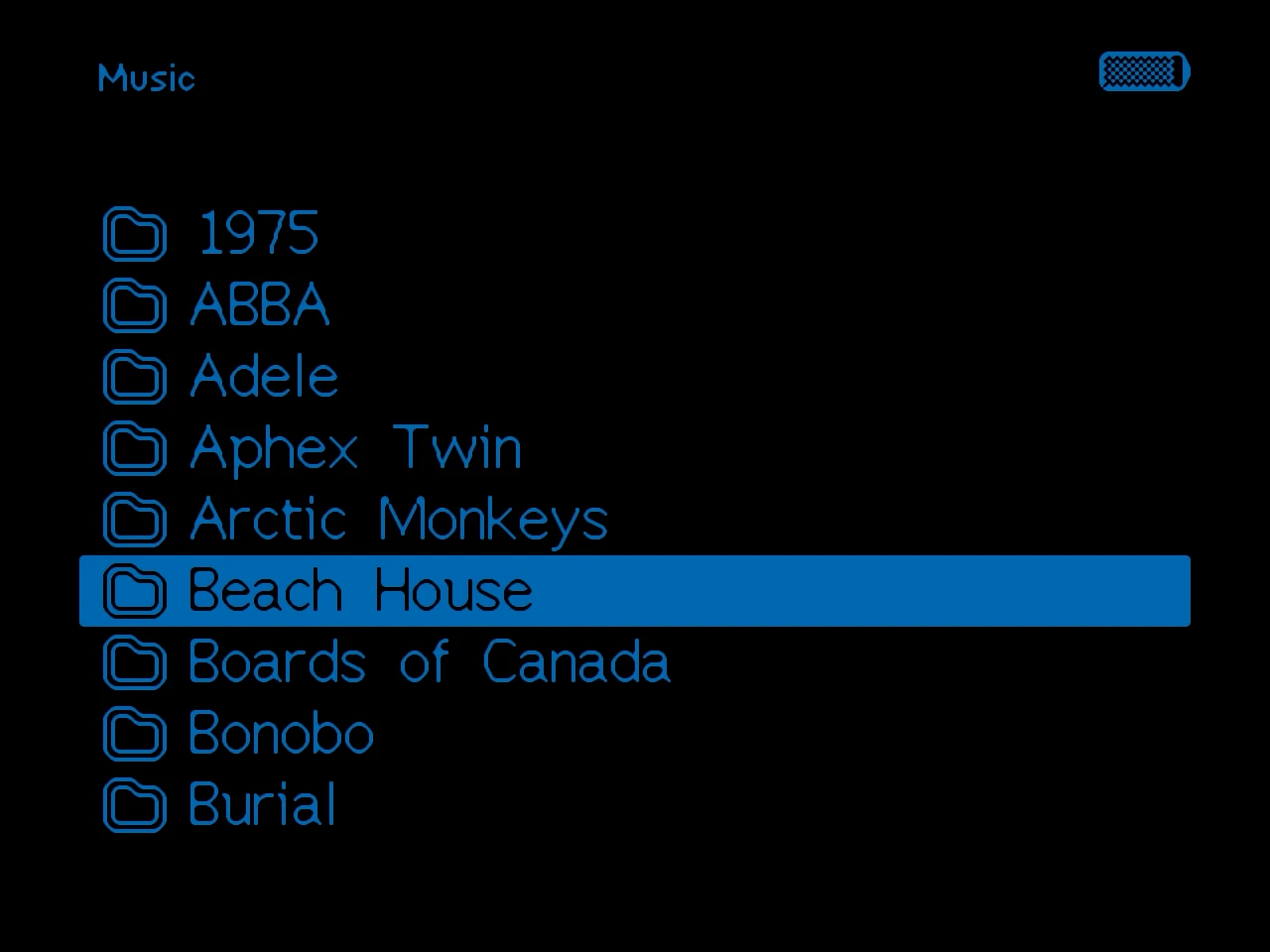
Scrolling through hundreds of artist folders on a click wheel takes a while. Now I can hold Select and choose “By First Letter…”, or press Select+Play: I get a list of the first letters that actually exist in the folder, and picking one jumps straight there. Latin letters first, and Menu switches to Cyrillic, Japanese and Korean.
Working out which script a letter belongs to is a few Unicode ranges:
static int letter_script(unsigned short ch)
{
    if (ch < 0x370 || (ch >= 0x1e00 && ch < 0x1f00))
        return SCRIPT_LATIN;           /* includes digits and symbols */
    if (ch >= 0x400 && ch < 0x530)
        return SCRIPT_CYRILLIC;
    if ((ch >= 0x3040 && ch < 0x3100) || (ch >= 0x3400 && ch < 0xa000))
        return SCRIPT_JAPANESE;        /* kana and kanji */
    if ((ch >= 0xac00 && ch < 0xd7b0) || (ch >= 0x1100 && ch < 0x1200) ||
        (ch >= 0x3130 && ch < 0x3190))
        return SCRIPT_KOREAN;
    return SCRIPT_OTHER;
}
Listening stats
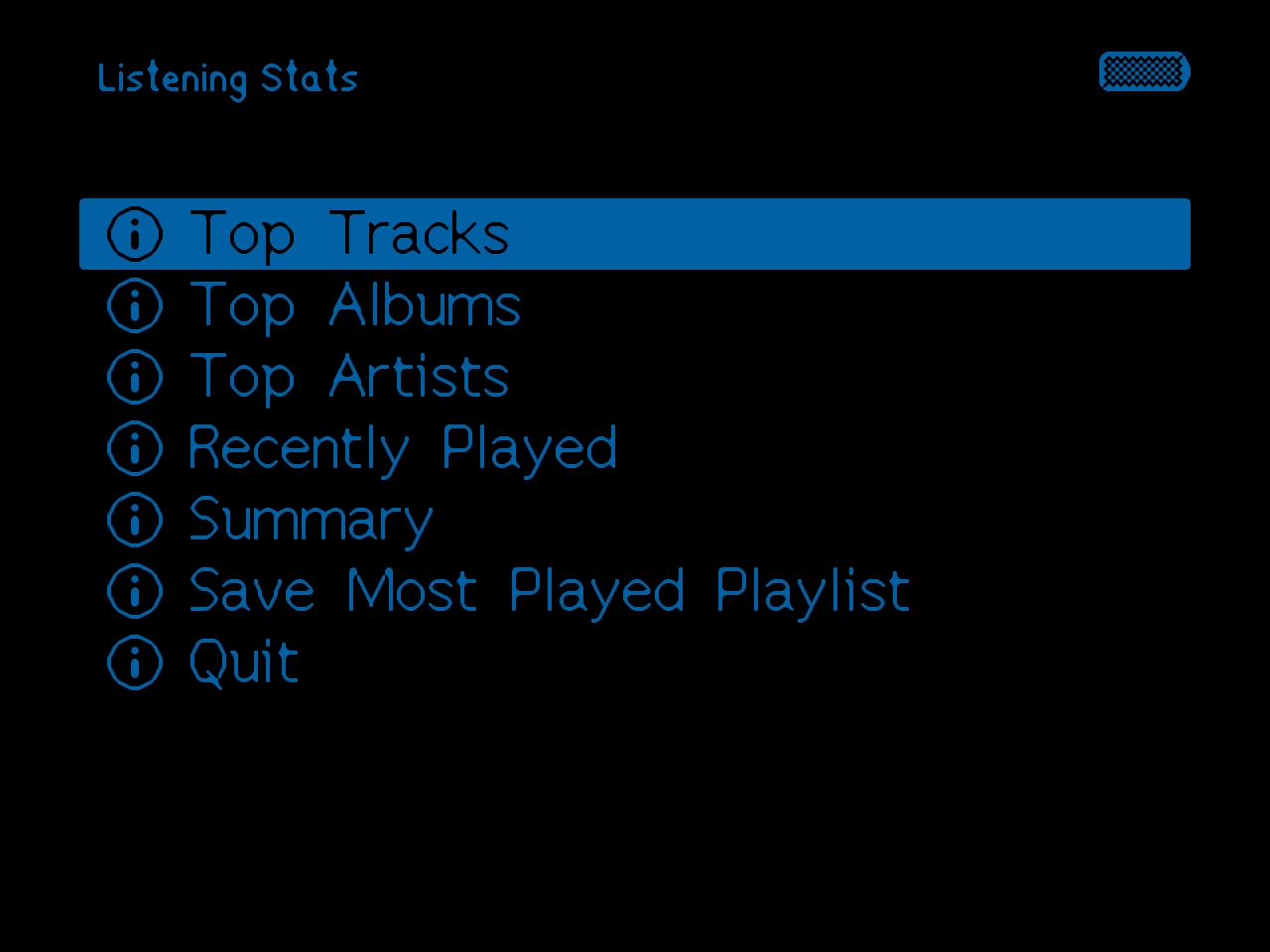
Rockbox can log every track you play. A new plugin, now in the main menu, reads that log and shows my top tracks, albums and artists, what I played recently and a summary. Picking any of them opens it in the file browser, and it can save my 100 most played tracks to my playlists folder. Artist and album come from the folder names, so it never has to read tags. When the log gets big, Rockbox starts a new one, and the plugin folds the old one into a small file of totals per track and archives it. That keeps my whole history without making the stats slower to open every year. It keeps only counts and where each name sits on disk, reading names back when they’re on screen, and it borrows the audio buffer, room for over a million tracks. The catch is that opening the stats stops the music.
What I took away
- Measure before fixing. The benchmark said which loops mattered, and the on-device log found the VU meter and the boot-time lookups, which I would never have guessed.
- Prove it’s the same. Comparing the patched build against stock, output for output, is what made me comfortable putting this on the player I use every day.
- Test on what you run. The worst day of this came from building on a development snapshot instead of the release.
- Simulators lie about memory. The freeze only existed where memory was tight.
Next up is the lookup that runs after every boot. Rockbox already reads the whole playlist file when it loads, so it could find each track in the directory cache right then instead of reading every path again one by one.